From photo to
perfect canvas print
Canvas Print Hero professionally prepares your images for canvas printing — with mirroring, markers and precise cropping. In seconds, not hours.
Everything you need for
canvas printing
From DPI checking to print-ready TIFF — Canvas Print Hero covers the entire workflow.
Professional Material Calibration
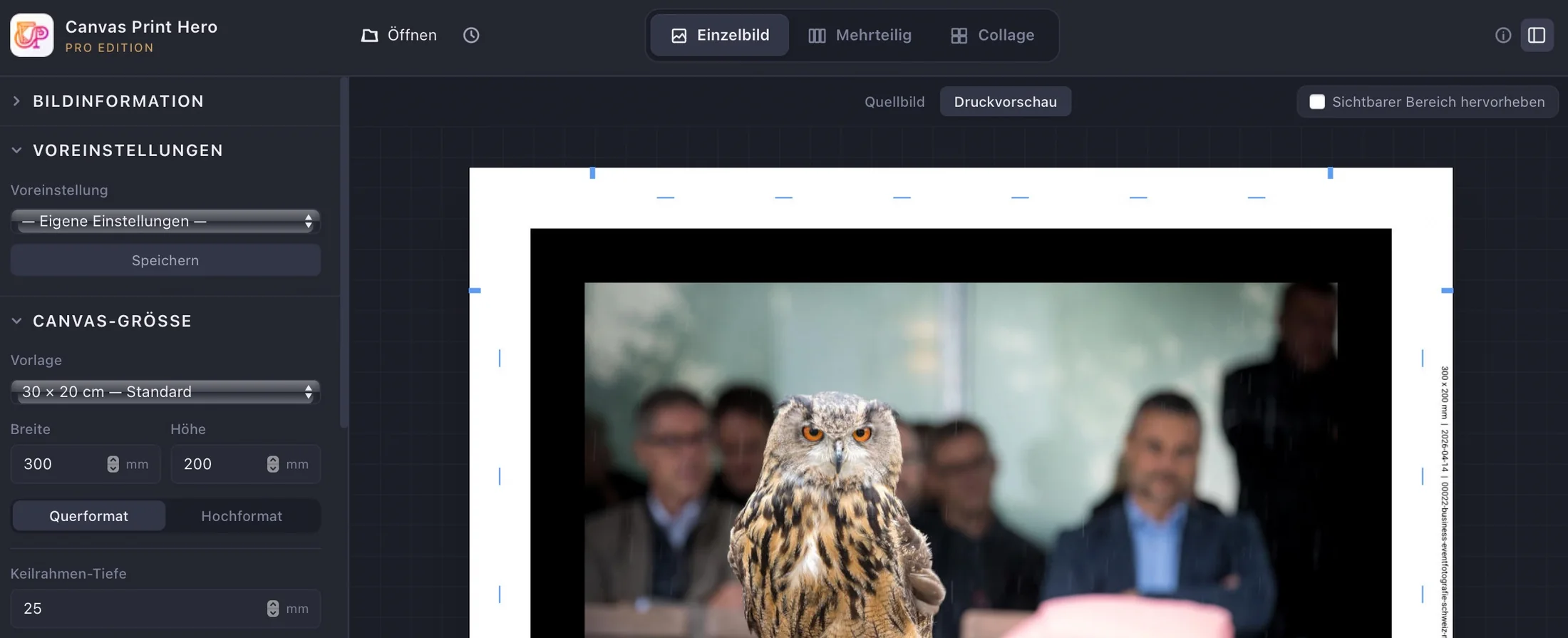
Compensates for canvas shrinkage during print — separate correction factors for roll length and width, print-orientation dialog and feed-direction marker on every export. No more undersized canvases.
5 Wrap Methods
Mirror, color fill, stretch, average color or image wrap — the right technique for every image.
DPI Quality Check
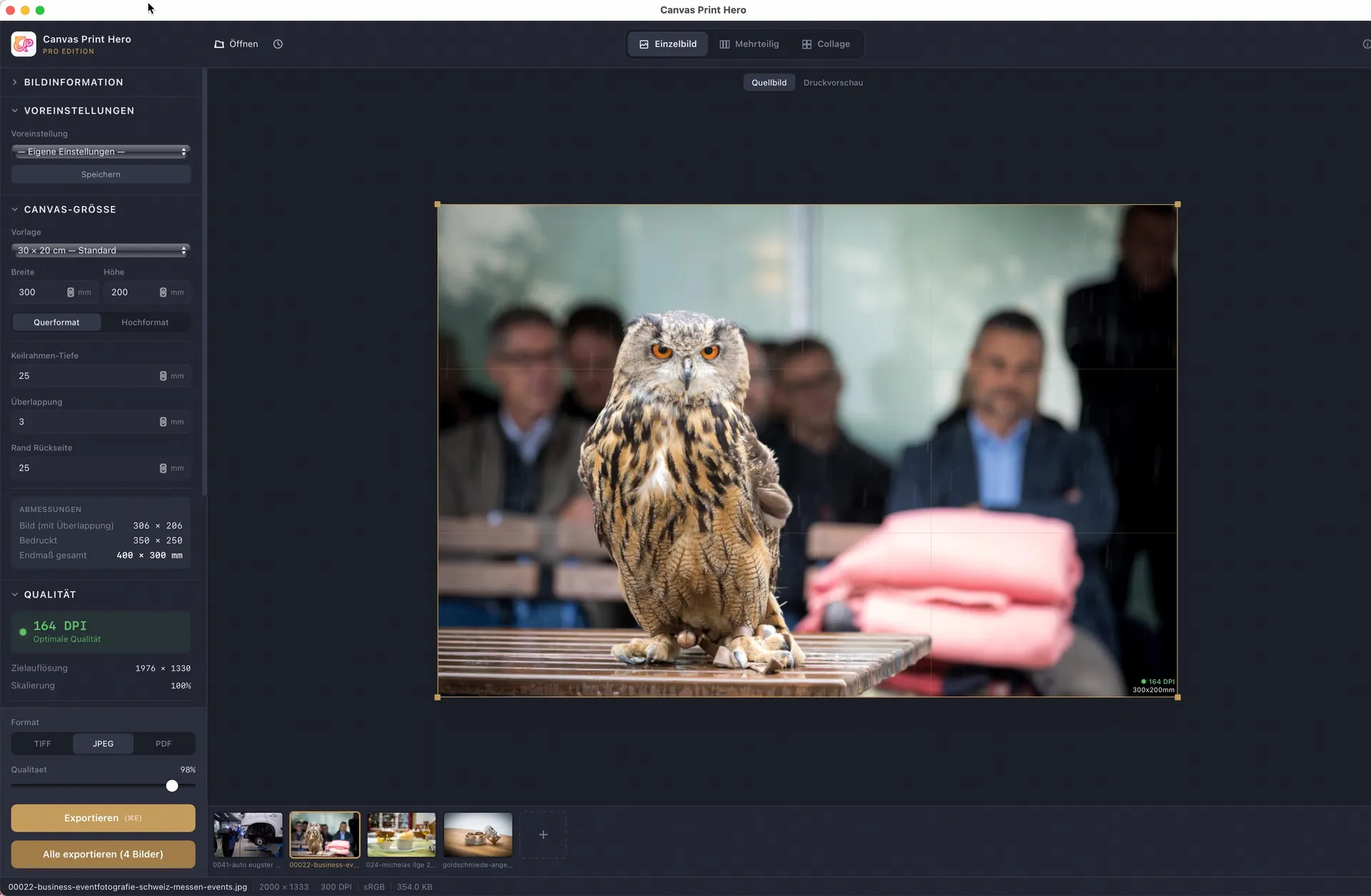
Instant traffic-light indicator showing if your image has enough resolution — before printing, not after.
Fold & Cut Markers
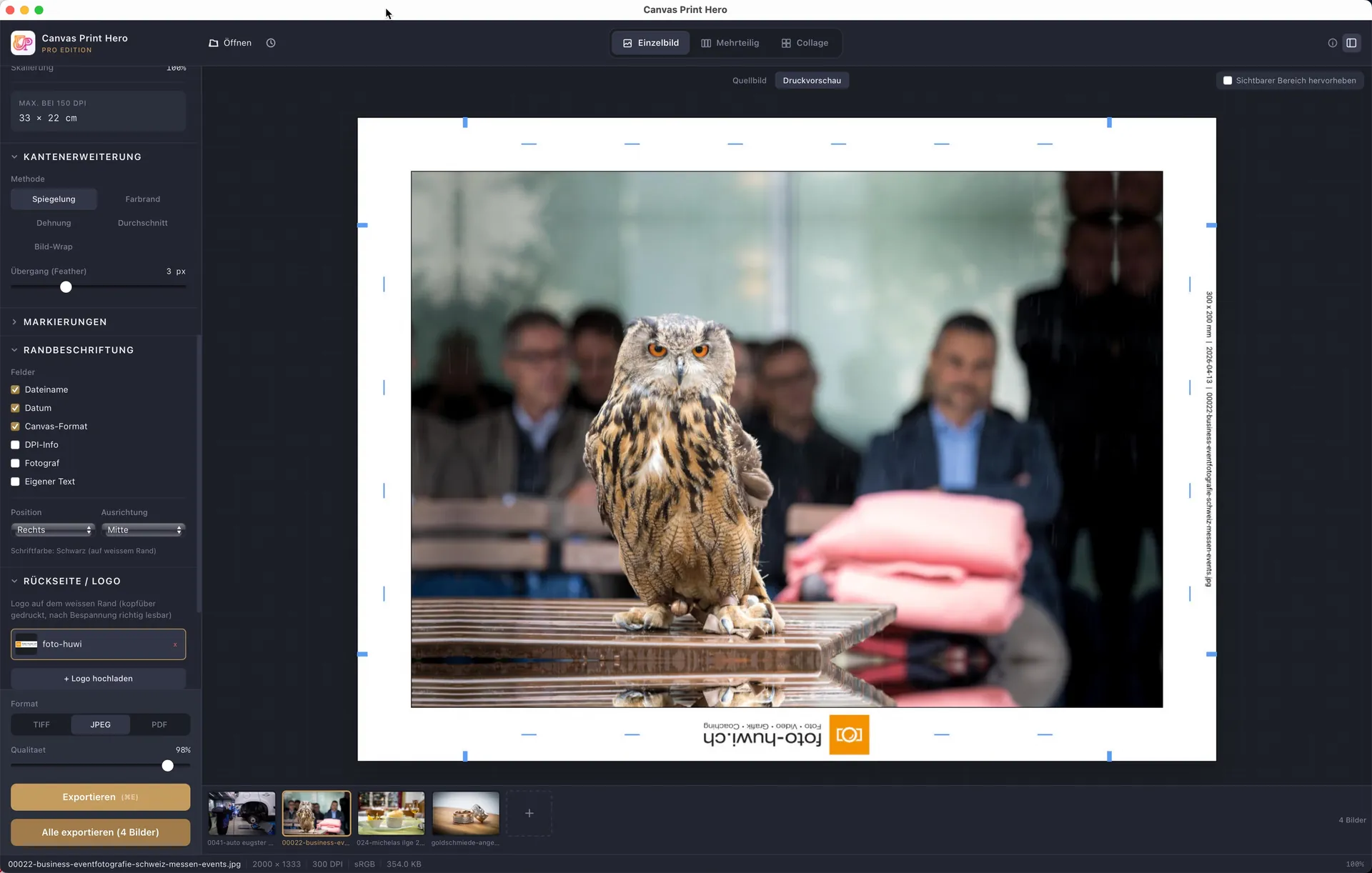
Precise lines for stretcher bar edges, staple positions and cut lines — right in the export.
Batch Processing
Prepare and export multiple images at once. Same settings, one click.
Triptych Mode
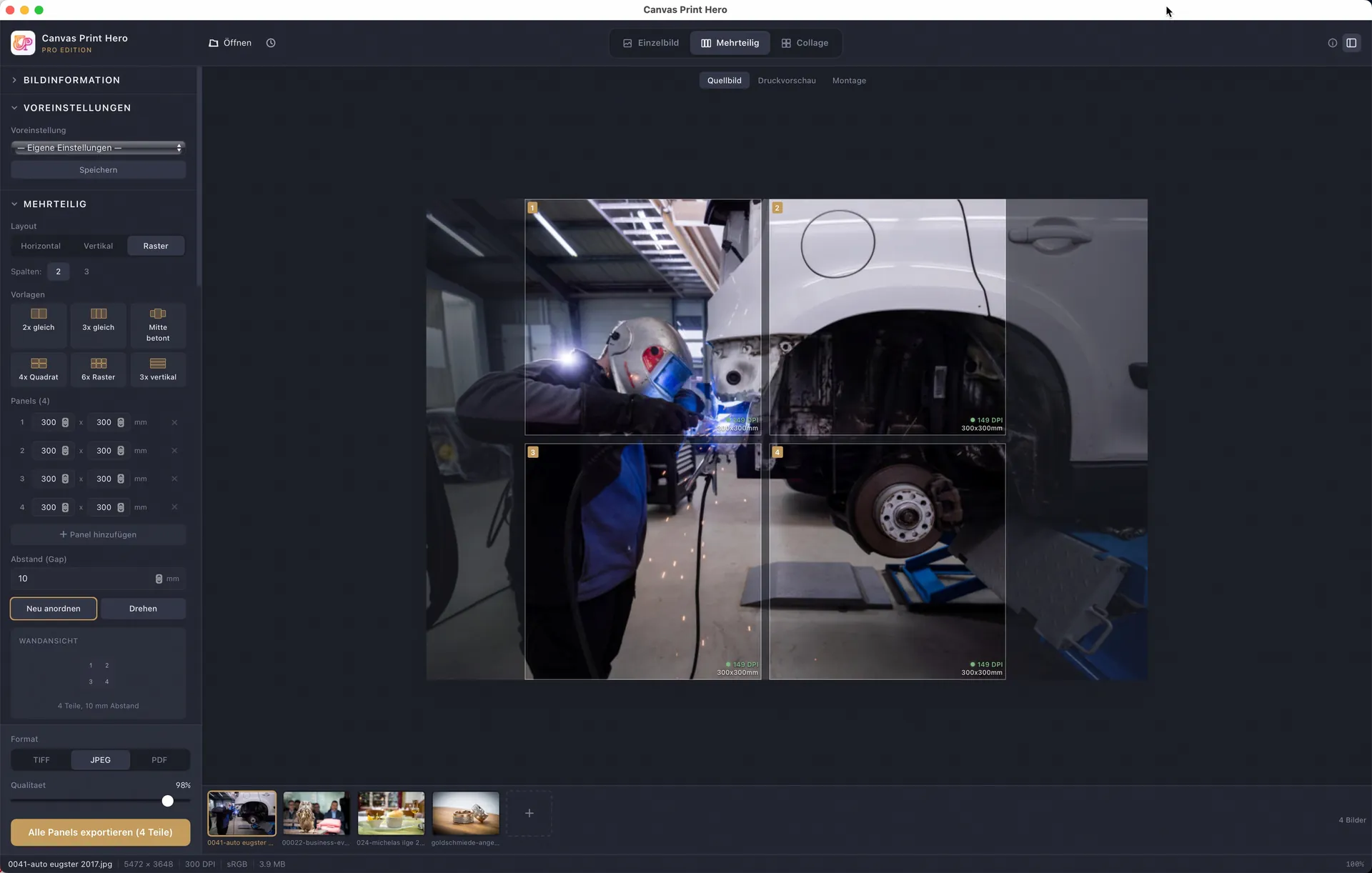
Automatically split multi-panel wall art — with gap calculation and offset.
TIFF, JPEG & PDF Export
Print-ready files with embedded ICC profile. Compatible with Mirage, Canon PPL and all RIPs.
Collage Mode
Combine multiple images in one canvas print. 9 templates, free arrangement, background images and drag & drop.
All Image Formats
JPEG, TIFF, PNG, PSD, WebP and HEIC/HEIF — just load any image, Canvas Print Hero handles it.
Logo & Backside
Print your own logo on the edge and backside. Logo manager with multiple profiles.
See Canvas Print Hero
in action
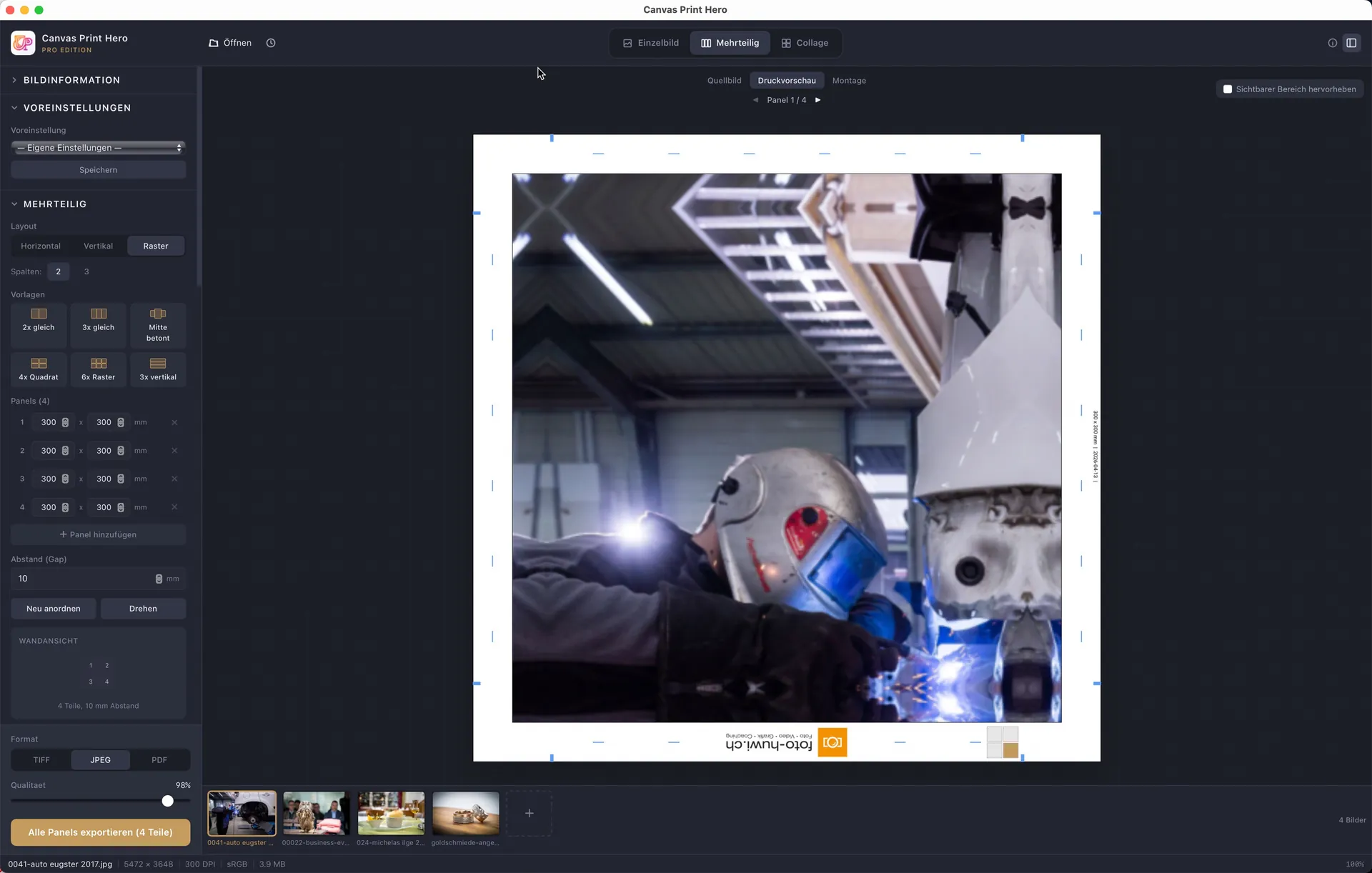
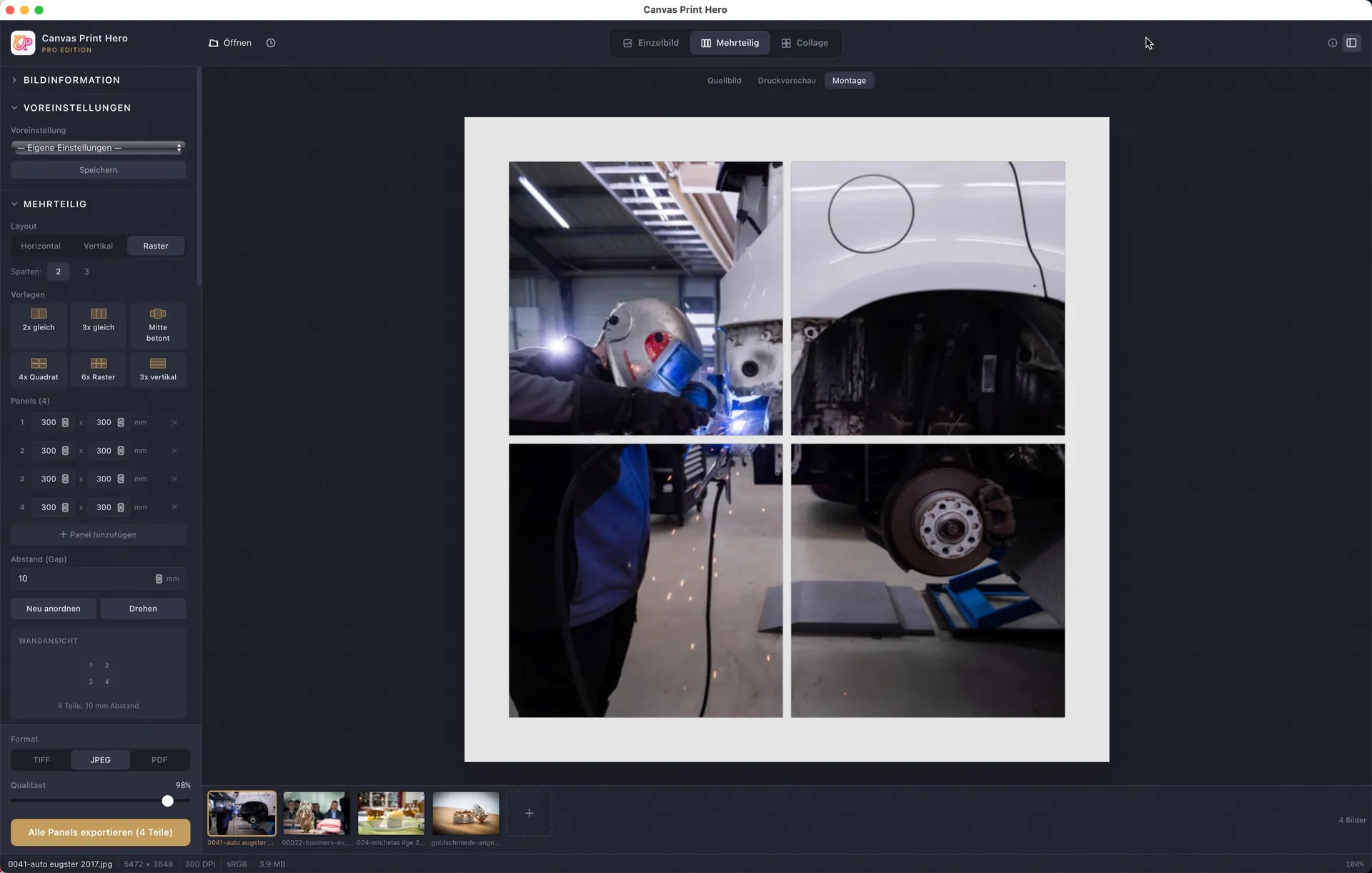
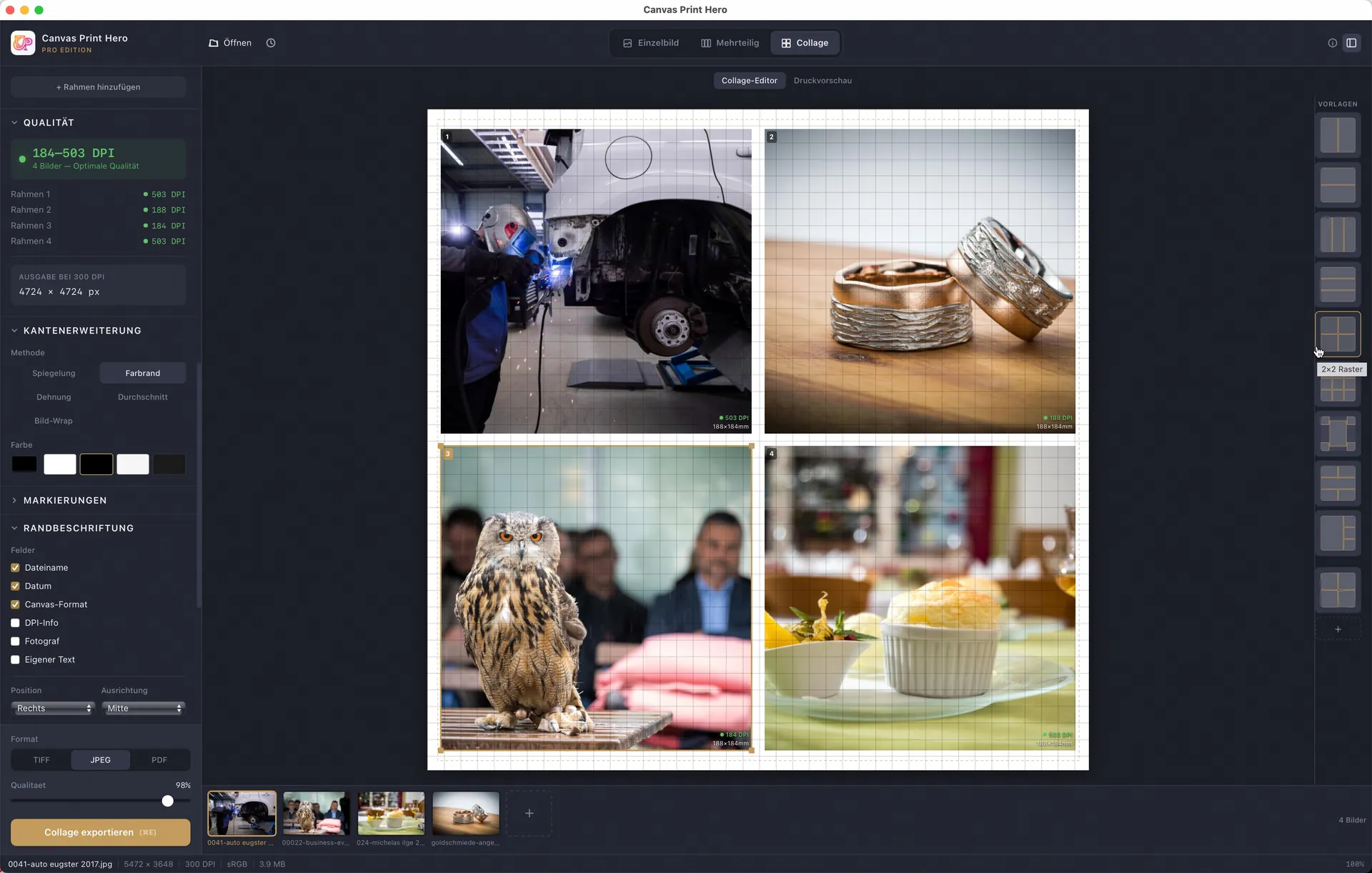
Three modes, one workflow — from single images to multi-panel wall art and photo collages.
Buy once, use forever
No subscription. No fine print. All updates within v26.x.x included.
- All features unlocked
- All 5 wrap methods
- DPI quality check
- Presets & settings
- Markers & edge labels
- Triptych & logo manager
- Export with watermark
- Export without watermark
- TIFF, JPEG & PDF export
- All 5 wrap methods
- Presets & settings
- Fold/cut markers
- Edge labels
- DPI quality check
- Everything in Standard, plus:
- Batch processing
- Triptych & multi-panel
- Collage mode
- Logo manager & backside
- Material calibration
- Priority support
Alle Preise inkl. MwSt.
Already on Standard? You can move up to Pro at any time for an additional payment. Upgrade to Pro
Download now
Canvas Print Hero is available as a free demo version. Download the app and get started.
Stay up to date
Get updates on new features, tips, and offers.
No spam. Unsubscribe anytime.
Canvas Print Software for Photographers — Canvas Wrap & Gallery Wrap Preparation
Canvas Print Hero is standalone canvas print software (a dedicated canvas wrap and gallery wrap tool) for professionally preparing canvas prints, stretcher bar images and gallery wraps. As purpose-built canvas printing software it replaces complex Photoshop workflows and expensive Photoshop plugins: Instead of manual edge mirroring in Photoshop, Canvas Print Hero handles everything automatically — edge extension (mirror, color fill, stretch, average color), fold and cut markers, DPI quality check and batch export. Available for macOS, Windows and Linux.
For the workflow itself, from finished size through the resolution check to export, see the step-by-step guide on how to prepare images for canvas prints.
For canvas print producers (B2B)
Canvas Print Hero is B2B software for businesses and self-employed professionals who produce canvas prints themselves — as a rule commercially and for resale. The software does not print and does not ship: it produces the print-ready file that is then output on your own large-format printer or in your own RIP. The target audience includes:
- Photographers and photo studios with their own large format printer (Epson SureColor, Canon imagePROGRAF etc.)
- Print shops, print labs and photo service providers offering canvas prints as a service
- Galleries and fine art printers producing fine art prints on stretcher bars
- Canvas print shops, print-on-demand businesses and online printers that want to automate their print preparation
Where Canvas Print Hero sits in the market
Five very different kinds of software and provider exist around canvas printing. They solve different problems but are frequently confused with each other. Here is where Canvas Print Hero sits:
- Photoshop actions and scripts (Breathing Color, Teckelworks, Adobe Exchange): they extend a single image, usually without batch processing and without material calibration. Canvas Print Hero runs standalone, in batches, and with measured shrinkage values.
- Photoshop plugins (Ultra Canvas): capable, but they require an ongoing Photoshop licence. Canvas Print Hero runs without Adobe and is a one-time purchase.
- Printer-vendor add-ons (Epson Print Layout): free, but tied to one manufacturer and limited to edge mirroring. Canvas Print Hero is printer-independent and adds markers, backsides and multi-panel splitting.
- Web-to-print storefronts (OnPrintShop, PrintXpand, Adventa): shop systems that let print businesses sell online. Canvas Print Hero prepares the file and replaces no storefront — the two complement each other.
- Photo labs and canvas suppliers (Pixum, CEWE, WhiteWall, myposter): they sell finished canvases to end customers. Canvas Print Hero is not a photo lab; it is the tool used by those who produce themselves.
Canvas Print Hero features in detail
Gallery wrap & edge mirroring (5 methods)
Five different wrap methods for edge extension: Mirror Wrap, Color Fill, Stretch Wrap, Average Color and Image Wrap. Each method suits different subjects — from landscapes to portraits.
Triptych & multi-panel canvas software
Canvas wrap software with built-in triptych and multi-panel mode. Automatically split a photo across multiple canvases — with individual panel sizes, gap calculation, offset and a wall sketch with overall dimensions. Ideal for multi-piece wall art and panoramic canvases.
Collage mode for canvas prints
Combine multiple images into a single canvas print with the WYSIWYG collage editor. 9 built-in templates, free arrangement via drag & drop, background images, frame effects (shadow, rotation, transparency) and undo/redo. All of it inside the print preparation itself — no detour through a layout program.
Batch processing
Process and export any number of images at once with identical settings. Ideal for print shops and print labs with high throughput. Progress indicator and detailed status reports per image.
Fold markers, cut lines & staple markers
Precise fold, cut and staple markers directly in the exported image. Essential for exact mounting on stretcher bars. Configurable colors, line weights and positions.
Logo manager & backside generation
Print your company logo on the image edge and generate a separate backside with logo, image title and production information. Multiple logo profiles for different clients or brands. Professional branding for your canvas print shop.
Compatible with all RIP software and large format printers
Exported files (TIFF, JPEG, PDF) are compatible with all major RIP software: DINAX Mirage, Canon Professional Print & Layout (PPL), Shiraz RIP, Colorbyte ImagePrint, Epson Print Layout and more. Works with any large format printer — Epson SureColor, Canon imagePROGRAF, HP DesignJet and others. ICC color profile embedding for accurate color reproduction.
Why Canvas Print Hero instead of Photoshop plugins?
Many photographers and print shops still prepare canvas prints with Photoshop scripts and plugins — Ultra Canvas, the Teckelworks Gallery Wrap Script, or the tools Epson and Canon ship with their printers. Canvas Print Hero takes a different route:
- No Adobe Photoshop required — standalone desktop app, saves the monthly Adobe license fee
- Triptych and multi-panel mode — no Photoshop plugin offers automatic splitting across multiple canvases
- Built-in collage mode with 9 templates — unique among all canvas wrap tools
- Material calibration with a test-pattern generator instead of a plain distortion correction — shrinkage values are measured, not guessed
- Batch processing, DPI checking and logo manager in a single app
- Excellent value for money, no subscription costs, no Adobe Photoshop required
Canvas Print Hero vs. alternatives — comparison table
| Feature | Canvas Print Hero | Ultra Canvas | Teckelworks | Epson Print Layout |
|---|---|---|---|---|
| Standalone (no Photoshop) | ✓ | ✗ | ✗ | ✓ |
| macOS + Windows + Linux | ✓ | ✗ | ✗ | ✗ |
| 5 wrap methods | ✓ | ✓ | ✗ | ✗ |
| Triptych / multi-panel | ✓ | ✗ | ✗ | ✗ |
| Collage mode | ✓ | ✗ | ✗ | ✗ |
| Batch processing | ✓ | ✓ | ✗ | ✗ |
| Fold/cut markers | ✓ | ✓ | ✓ | ✗ |
| Logo & backside | ✓ | ✓ | ✗ | ✗ |
| All printers (not vendor-locked) | ✓ | ✓ | ✓ | ✗ |
Frequently asked questions about canvas wrap software
What is Canvas Print Hero?
Canvas Print Hero is a standalone desktop software (canvas wrap software / gallery wrap software) for professional canvas print preparation. The app automatically calculates edge extensions for stretcher bars, adds fold and cut markers and exports print-ready files. Available for macOS, Windows and Linux.
Do I need Adobe Photoshop for Canvas Print Hero?
No. Canvas Print Hero is a standalone application and does not require Adobe Photoshop. Unlike Photoshop plugins like Ultra Canvas or scripts like Teckelworks Gallery Wrap, Canvas Print Hero works completely independently. This saves you the monthly Adobe license fee.
What is the difference between Canvas Print Hero and a Photoshop plugin like Ultra Canvas?
Ultra Canvas is a plugin that requires Adobe Photoshop. Canvas Print Hero is a standalone desktop app that works without Photoshop and adds further capabilities: triptych/multi-panel mode, collage editor, DPI quality check and support for macOS, Windows and Linux.
Which wrap methods (edge extensions) are supported?
Canvas Print Hero supports 5 different wrap methods: Mirror Wrap, Color Fill, Stretch Wrap, Average Color and Image Wrap (Gallery Wrap). The optimal method depends on the image subject.
Can I create multi-panel canvas prints (triptych, diptych)?
Yes. Canvas Print Hero has a built-in multi-panel mode. You can automatically split a single image across 2, 3, 4 or more canvases — including gap calculation, individual panel sizes and a wall sketch with overall dimensions.
Does Canvas Print Hero work with my large format printer?
Yes. Canvas Print Hero exports standard-compliant image files (TIFF, JPEG, PDF) with embedded ICC profiles. These files work with any printer and any RIP software — including Epson SureColor, Canon imagePROGRAF, DINAX Mirage, Shiraz RIP, Canon PPL and Colorbyte ImagePrint.
Is Canvas Print Hero for consumers or for businesses?
Canvas Print Hero is B2B software for canvas print producers: photographers with their own large-format printer, print-on-demand businesses, digital print shops, fine-art printers and galleries that make their canvases themselves — often for resale. The app does not print and does not ship; it produces the print-ready file for your own printer or RIP.
What does Canvas Print Hero cost, and is the price changing?
The current prices are introductory prices valid until 30 November 2026: Standard EUR 89, Pro EUR 149 (CHF 78 / 138, USD 99 / 159). From 1 December 2026 the regular prices apply: Standard EUR 129 and Pro EUR 249 (CHF 119 / 229, USD 139 / 269). Buy before that date and you keep your licence at the introductory price; all updates within v26.x.x are included. You can move from Standard to Pro at any time for an additional payment.
Is there a free trial?
Yes. The demo version of Canvas Print Hero offers full functionality — all features, all wrap methods, all modes. The only limitation: exported images contain a watermark. This lets you thoroughly test the software before choosing the Standard or Pro edition.